
How to Safely Pack and Transport Your Smart TV & Electronics
Author: Happy Packers and Movers Date: 09/07/2026 16:48
How to Safely Pack and Transport Your Smart TV & Electronics
Modern homes are filled with expensive electronics. A Smart TV in the living room. A gaming console. Desktop computers. Wi-Fi routers. Home theatre speakers. Laptops that carry years of work.
Buying new will cost you.
That's why safely packing them and protecting delicate screens, internal circuits and sensitive components that don't respond well to vibration or impact.
At Happy, we've completed 1000’s of electronic relocations across India. One thing remains true every time: most electronic damage happens when packing not in transportation. Professional packing methods and quality materials makes all the difference.
Start by Backing Up Your Data
Before touching a single cable, save what's important.
If you're transporting:
- Desktop computers
- Laptops
- External hard drives
- NAS storage
create a backup first.
Hardware can be repaired or replaced. Personal memories and important documents cannot. It only takes a few minutes but it offers complete peace of mind.
Capature A Photo of Every Cable Before Disconnecting
Here's a trick many people overlook. Take photos of the back of your TV, Wi-Fi router, soundbar, gaming console or desktop setup before unplugging everything.
So later on reconnecting becomes surprisingly easy.
You won't spend an hour wondering which HDMI cable belongs where.
Keep Original Boxes If You Still Have Them
Manufacturers design original packaging for transportation.
The foam inserts support screens and delicate components exactly where they need protection.
If you have the original carton for your Smart TV or gaming console, use it.
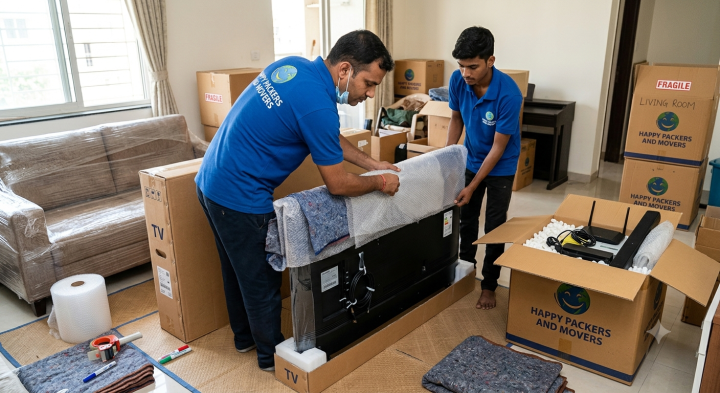
If not, professional movers use custom-sized corrugated cartons, foam sheets, bubble wrap and edge protectors to provide similar protection during transit.
Never Wrap a Television With Bubble Wrap AloneThis is one of the biggest packing mistakes. Bubble wrap protects against scratches. It doesn't prevent screen pressure.
Professional movers usually follow a layered approach:
- Soft foam sheet directly over the screen
- Corner protectors
- Bubble wrap
- Stretch film
- Heavy duty corrugated carton
Each layer has a purpose. Together, they greatly reduce transit risk.
Remove Loose AccessoriesBefore packing:
- Remove TV stands
- Detach wall brackets
- Take batteries out of remotes
- Pack cables separately
- Label every accessory
Small parts disappear surprisingly quickly during relocation. Labelling everything now saves time later.
Avoid Overloading One BoxPeople often place routers, speakers, remotes, chargers, extension boards, and cables inside one carton. It sounds organized. It isn't.
Heavy adapters can damage delicate electronics during transportation.
Pack similar items together and avoid unnecessary weight inside a single box.
Transport Electronics Upright
Large televisions should always remain upright during loading.
Laying them flat increases pressure on the display panel, particularly during long-distance transport over uneven roads.
Experienced packers and movers load electronic items carefully, keeping heavy furniture away from fragile appliances throughout the journey.
Should You Move Electronics Yourself
Customers ask us this regularly. For a short local move involving one television, transporting it personally may work if you have proper packing.
For interstate relocation or a full house shift, professional handling is the safer option.
Large electronics require:
- Proper cushioning
- Secure loading
- Balanced vehicle placement
- Moisture protection
- Careful unloading
These details reduce the chance of accidental damage.
Common Questions People Ask
Can I transport my Smart TV without its original box?Yes. With quality packing materials you can provide excellent protection when original packaging isn't available.
Should I remove the TV from its wall mount?Yes. Always detach brackets and pack them separately.
Is it safe to leave cables connected?No. Disconnect and label every cable before packing.
Do electronics need insurance?For expensive televisions, home theatre systems, gaming consoles and computers in long-distance relocation, transit insurance is worth considering.
Final Thoughts on How to Safely Pack and Transport Your Smart TV & Electronics
Packing electronics isn't about wrapping everything. It's about protecting equipment that can be expensive to repair or replace.
Using proper materials, careful loading techniques and organized packing helps your Smart TV and electronic devices reach their destination safely.
Happy Packers and Movers has been providing professional relocation services since 2006 and offers household shifting, office relocation, vehicle transportation, warehousing, secure packing solutions with trained moving specialists across India.
For guidance on transporting televisions, computers or other electronic appliances safely, call 91759 37523 or email info@happypackersmovers.in.